
Next Generation Data Analytics > Universe Conversion
Universe Conversion
Transitioning to the New SAP Universe Format
In the next major release of Business Objects, SAP will no longer support the legacy universe format. As a result, we are converting all legacy universes to the new universe format.
An SAP Business Objects universe enables report writers to create and refresh reports without needing to write complex queries. By using the universe, report writers can drag and drop the data objects they need for their reports. Once the report is created, it can be filtered, sorted, and formatted. Universes are accessible through the Web Intelligence application, either through the EDDIE reporting environment via a web browser or through the Web Intelligence Rich Client application.
How the Universe Conversion Affects Your Reports
Once a universe is converted to the new format, reports that were created using the old universe format will need to be updated to point to the new universe. Here's how this will impact you:
- If you access Web Intelligence in EDDIE and save your reports in the EDDIE Repository: AITS will automatically repoint these reports to the new universe. No action is required on your part.
- If you access the Web Intelligence client application on your computer and save your reports locally, in a file share, on Box.com, or some other location and do not save your reports in the EDDIE Repository: You will need to manually update them to point to the new universe. See Universe Conversion: Manually Repointing Documents for instructions. You will need to manually update these reports within 90 days of the universe conversion.
- Some reports may not be able to be used with the new universes. These reports will have to be recreated.
Universe Decommission Webinar
Job Aids and Resources
For a smooth transition, we’ve provided a helpful flowchart for your reference. (Flowchart text alternative)
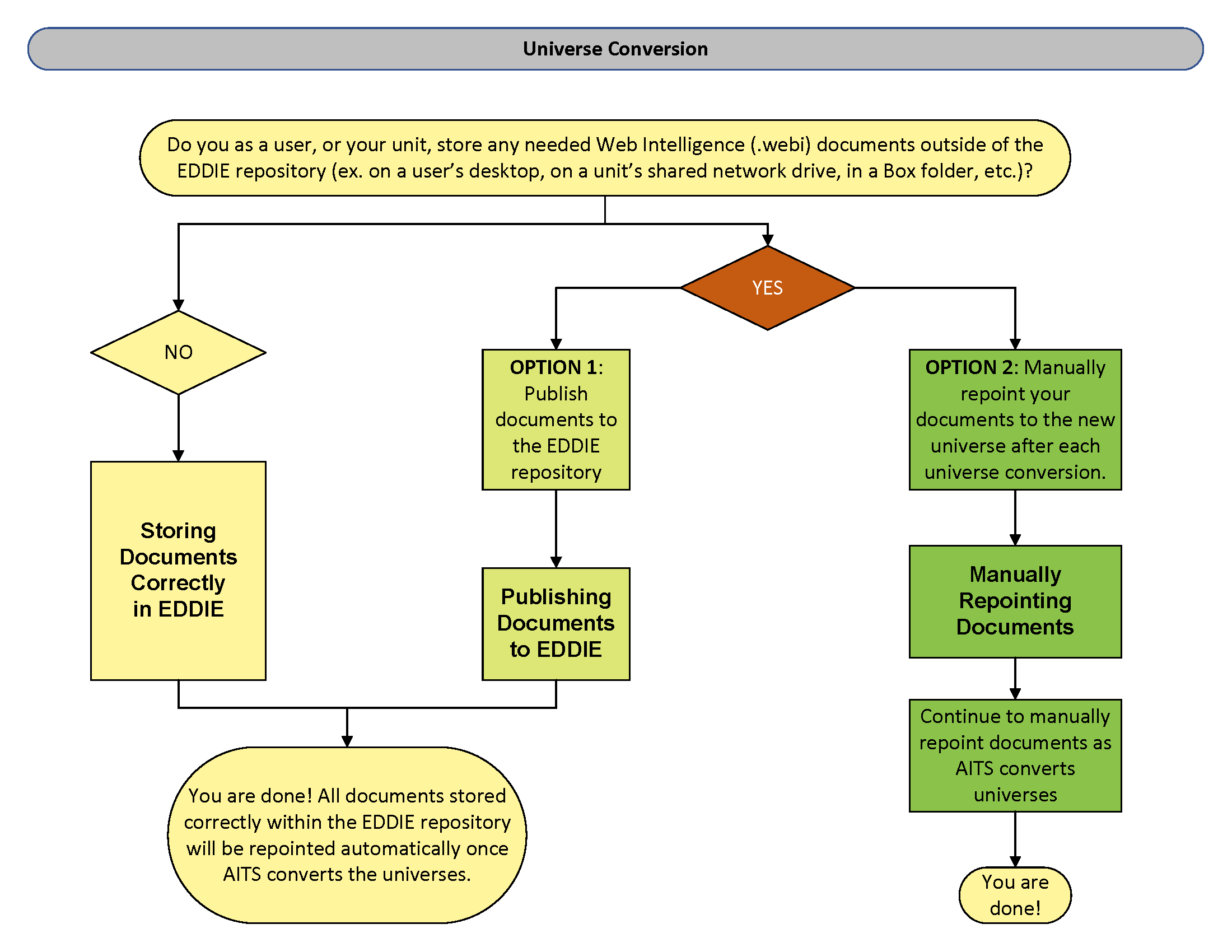
Additionally, you can refer to the following job aids for detailed instructions:
Extra Help Available
If you use the Web Intelligence application on your desktop and have a large number of reports, AITS can assist with the repointing process. AITS can move your reports to the EDDIE repository, where they will be automatically repointed to the new universe. Afterward, we’ll share instructions for downloading your reports, or you can choose to leave them in EDDIE and access them via a web browser. Please send email to dsuss-AITS@mx.uillinois.edu to request AITS help with the repointing process.
AITS Suggestion
With the Business Objects product roadmap calling for the Web Intelligence Rich Client (WRC) desktop app to be discontinued within the next few years, AITS suggests that you start moving to the browser version of Webi. Both versions have the same features. If you share documents with others in your department, you can ask for a shared folder in EDDIE to store and share your documents. For more help or information, contact AITS Decision Support.
Schedule and Status
This process will take around 18 months to complete. Universes will be converted in groups based on subject. You will be notified when the universes you use are being converted.
Additional Information
You should review all of your saved documents and complete the following steps:
- Remove any unneeded reports
- If you have a folder Webi Conversion determine if that folder and the reports in it are needed. This may be a left over folder from previous conversions. Remove the folder and any reports in it if not used.
- If you use the ~Web Intelligence folder in EDDIE, please move all needed reports to a different folder. The ~Web Intelligence folder is a system folder that acts like a temp folder while editing reports. Do not delete this folder.
Contact
If you have any questions or need assistance, please feel free to contact the DS User Support Group at dsuss-AITS@mx.uillinois.edu.